How AI Agents Can Run the AP Process

Last month we met about 20 CFOs from Poland, Germany, the Netherlands and France. One thing surprised me more than anything else: the process with the most people working on it was AP and AR - accounts payable and accounts receivable.
The CFOs fell into two groups. The first had built AI workflows and agents themselves - one told us their entire month-end close is now prepared by an agent. The second group was testing AI and working out how to bring it into their teams.
What shocked me was that even in the first group, AP and AR were still done mostly by people. Picture a three-person finance team: the CFO plus two people doing AP and AR. The CFO has automated the close, while two-thirds of the team is still processing invoices and chasing payments.
So we worked through it with them. How would agents run AP and AR in their company? The answer depends on the business model - the invoicing schedule, what you charge clients for, and what you pay suppliers for.
After a few of those brainstorms, we came up with a framework for an AP process run by agents. By our estimate, it can cut the time people spend on these workflows by up to 80%.
In this article I'll show you what the process looks like, the exceptions it has to handle, and how to implement it in your finance team. AR deserves its own article.
Rules calculate, agents interpret
The most important design decision is not which AI model you use. It's deciding where AI runs at all.
Most of AP is calculation: is the invoice within 2% of the PO price, is the VAT ID valid, is this due date inside the payment run, does this bank line equal that invoice. These checks must be deterministic - same input, same output, every time, fully auditable. Putting an LLM there adds risk and cost for no benefit.
Agents belong where judgment, context and communication are needed:
- Reading messy documents and deciding what they are
- Coding an invoice when the history and the description point in different directions
- Explaining why something doesn't match and drafting the email to the vendor
- Chasing people - approvers, requesters, vendors - with the context they need to act
The rule of thumb: rules detect, agents interpret. A rule decides that something is an exception. The agent decides what to do about it.
The process, step by step
Here is what an agent-run AP process looks like for a typical EU company. For each step: what it does, whether a rule or an agent runs it, and which system it talks to.
Where rules run and where agents run.
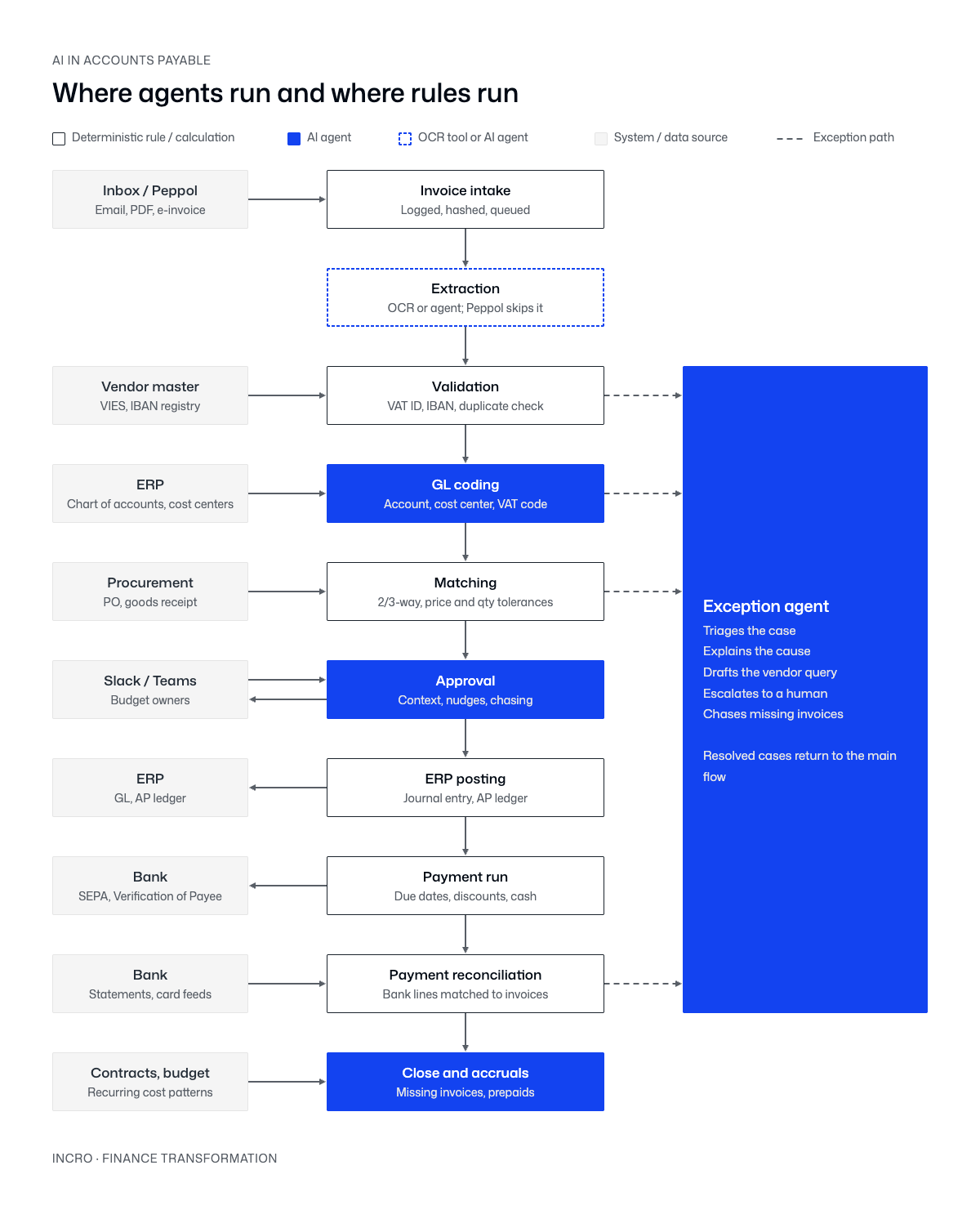
- Invoice intake - rule. Invoices arrive by email, PDF or Peppol e-invoice. Each one is logged and hashed so the same file can't enter twice.
- Extraction - OCR tool or agent. Fields, line items and document type (invoice, credit note, pro forma). Classic OCR handles clean layouts. An agent handles the messy ones. Peppol e-invoices skip this step entirely - they arrive structured.
- Validation - rule. VAT ID checked in VIES, IBAN checked against the vendor master, duplicate check on vendor, amount and date.
- GL coding - agent. Account, cost center, project and VAT code, proposed from vendor history and the line description in your ERP's chart of accounts. Each proposal comes with a confidence score - low confidence goes to a human.
- Matching - rule. 2-way or 3-way match against the PO and goods receipt from your procurement system, with price and quantity tolerances you define.
- Approval - agent. The routing matrix is a rule. The agent's job is everything around it: sending the request in Slack or Teams with context ("this is 40% above this vendor's monthly average") and chasing until it's done.
- ERP posting - rule. Journal entry and AP ledger update.
- Payment run - rule. Due dates, early-payment discounts and cash position produce a SEPA file. Verification of Payee checks the name against the IBAN before money leaves.
- Payment reconciliation - rule. Bank statements and card feeds are matched to invoices on amount, reference and vendor. Anything unmatched becomes an exception.
- Close and accruals - agent. Comparing recurring cost patterns, contracts and budget against what was booked, the agent finds costs with no invoice yet and proposes accruals and prepaid schedules.
Count them: six rules, three agents, one either-or. That ratio is the point. The agents are not the process - they're the parts of it that used to need a person.
Exceptions are where agents earn their keep
The happy path was automatable ten years ago. What wasn't automatable is the invoices that fall off it - and that's where a dedicated exception agent changes the economics.
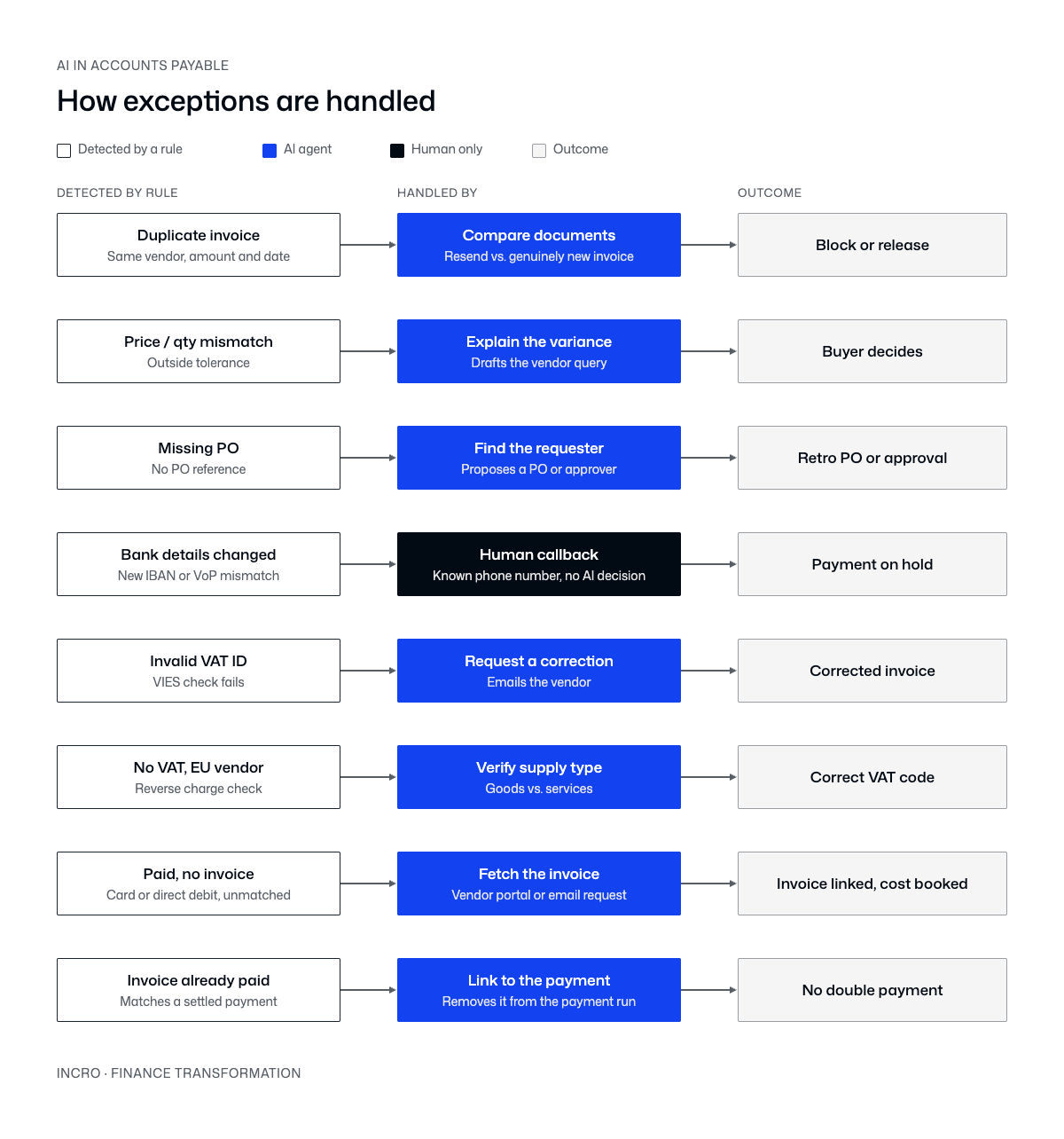
Two of these deserve attention.
Paid but no invoice, and its mirror, invoice already paid. This is the SaaS problem. Subscriptions get charged to company cards or direct debits, the invoice lands in someone's inbox weeks later - or never. Then the invoice reaches AP and gets paid again by transfer. In companies with a large SaaS stack, it's one of the most common AP mistakes. Reconciliation catches it only if payments and invoices are matched both ways.
Bank details changed is deliberately not an agent task. Changed-IBAN fraud is the most common attack on AP. An email saying "we have a new bank account" is exactly the kind of message an agent might process confidently. So this one goes to a person who calls the vendor on a number already on file. Knowing where not to use AI is part of the design.
Same ten steps, different process
The steps above are universal. What the CFO conversations showed us is that what changes by business model is what the invoice gets matched against, how costs are allocated, and where the exceptions pile up. That decides where the agents go.
- SaaS / tech scale-up - few POs, lots of card payments and subscriptions. Agents: coding, prepaids, payments with no invoice.
- Manufacturing / distribution - 3-way match on PO and goods receipt. Agents: price and quantity variances, vendor disputes.
- Professional services / agencies - costs tied to client projects. Agents: project tagging, catching costs that never got rebilled.
- Multi-location (gyms, clinics, retail) - recurring rent and utilities per site. Agents: location coding, missing invoices, cost spikes.
- Construction / real estate - progress invoices against the contract. Agents: contract checks, retention tracking.
- Holding / PE portfolio - many entities. Agents: finding the right entity, intercompany recharges.
A SaaS company and a distributor can run the same software and need completely different agents. That's why off-the-shelf AP automation often disappoints - it's built for the median company, and nobody is the median company.
How to build it for your company
Before any tool or model choice, answer four questions:
- What drives your costs? POs, contracts, subscriptions or projects.
- What must an invoice be matched against? That's your matching logic and tolerances.
- What are your allocation dimensions? Cost center, project, location, entity - this is what the coding agent has to learn.
- Where do exceptions pile up today? Ask your AP team which invoices they touch more than once. That list is your agent backlog.
Then build in this order:
- Map the process as it really runs, not as the policy says. Include the workarounds - they hide the real exceptions.
- Write down the rules first. Tolerances, approval matrix, duplicate logic, reconciliation keys. If you can't write it as a rule, it's a candidate for an agent.
- Connect the data sources. ERP, procurement, bank feeds, e-invoicing, Slack or Teams. Agents are only as good as what they can see.
- Start agents in suggest mode. The agent proposes, a person approves. Track how often the person changes the proposal.
- Hand over step by step. When an agent's proposals are accepted unchanged consistently, let it act on high-confidence cases and keep humans on the rest.
Keep humans on three things: bank detail changes, anything above your materiality threshold, and anything the agent flags as low confidence.
The takeaway
The CFOs who automated their close but not their AP weren't behind on AI. AP just doesn't automate with one clever prompt - it needs a designed process. Agents won't replace your AP process. They'll run the parts of it that today need a person - reading, coding, explaining, chasing - while rules keep doing the math. The companies that get this right don't buy "AI for AP". They design their own process first and put agents exactly where their exceptions are.
Matt co-founded incro in 2020. Since then, he has worked with over 100 companies - from early-stage startups to PE-backed businesses across a wide range of industries.
He is an expert in corporate finance, FP&A set-up, and forecasting, and has built a reputation for turning complex financial functions into clear, board&investor-ready systems.
At incro, Matt drives company growth while designing the analytical frameworks and solutions that define how the firm delivers transformation — including co-creating CFO Studio, incro's AI-powered financial analysis platform.
He holds a degree from SGH Warsaw School of Economics and is the author of Methods and Procedures in the Assessment of Capital Investments (Difin, 2023), a rigorous framework for evaluating investment profitability, now used as an academic reference. Matt was named to the Forbes 30 Under 30 Poland list in 2025.
Your financial data won't fix itself.
30 minutes. We'll tell you exactly where your data is costing you money — and what AI can do about it.