Variance Analysis Agent
A cybersecurity software group cut its month end variance analysis from twenty hours to two, and moved board pack delivery from day ten to day five.
Close acceleration
Time on this task
Board pack ready
Want to see what we'd build for you?
The Situation
The client is a cybersecurity software company with a group structure across several entities and business units, all rolling into one consolidated P&L. Their chart of accounts was genuinely good. Every entity and every business unit had its own accounts, cleanly mapped up to group level. That is rarer than it should be, and it is the reason this project was possible at all.
Every month end, one FP&A analyst built the variance analysis, group P&L against budget, same structure on both sides, with commentary for the board pack. This was one sub-workflow inside a larger close process. Accruals and reconciliations were handled elsewhere, so variance analysis always started from closed books. The variance package covered P&L and balance sheet. Deeper revenue work, cohort analysis, was a separate process entirely.
That combination of a regular task, done by one person, on a well structured data foundation, is exactly the profile we look for when we call a workflow ready for an agent. Not simply that AI would be nice to have. Ready, because the foundation was already clean.
What we build
The client's IT and privacy policy would not allow a direct MCP connection between their ERP, Sage, and Claude, and it ruled out Claude Cowork as well. So the process stayed manual at the data transfer step. An analyst exported and uploaded the files rather than one system talking to another. Everything downstream of that step was automated. The upload step was not.
We compute the number deterministically and let AI explain it. Someone still has to hand over the number by hand.
Before the agent
- Confirm the month is closed and data is ready
- Go into Sage, export the GL
- Copy the variance analysis Excel model
- Load the new GL, confirm any historical restatements
- Normalize the data
- Check for budget/forecast changes against the budget source file
- Build new tables for the month summary and YTD summary
- Add the variance columns, value and percentage
- Add a commentary column
- Gather context on specific changes in sales and costs
- Format the data
- Analyze it
- Write commentary per business unit and per business line
- Prepare the month summary for the board pack and upload it
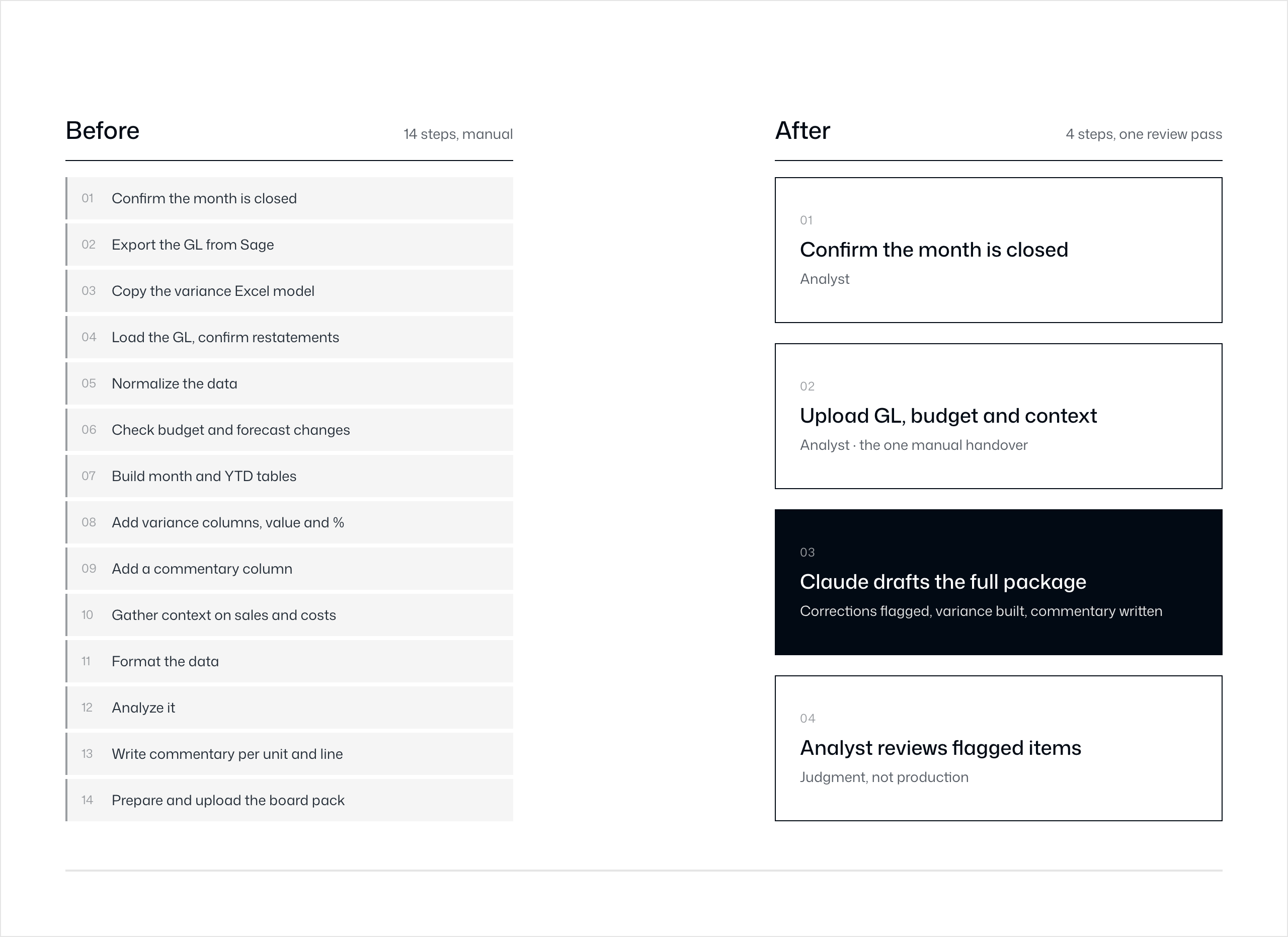
Fourteen steps, most of them mechanical, one analyst, every month. This is the kind of task that looks fine on paper and quietly burns 20 hours because nothing about it is hard. It is just long.
After the agent
Given the limitation above, we built this inside the Claude ecosystem rather than around it, using a Skill.md that grew into a plugin, a set of skills, plus a project folder holding the historical context. The process now runs as follows.
- The analyst confirms the month is closed before doing anything else.
- They export the GL, upload it to the chat together with the budget file and any context gathered from sales, marketing, and HR.
- Claude, following the plugin's instructions, produces a new file. Historical data is corrected, with every correction flagged in a task summary. Variance analysis is built, formatting is applied, and commentary is written for each business line and business unit. The account mapping for revenue and cost lines lives in the skill, not in the analyst's head.
- The analyst reviews what was flagged, checks the variances, and deepens the commentary on anything strategically material.
The result was two hours instead of twenty. The steps that used to take most of the day were absorbed into the draft Claude produced, and the analyst's time went into review rather than production.
What could be done differently
The limitation is also the roadmap. A unified finance data layer, one connection point across the ERP, the budgeting spreadsheet, and context sources such as the CRM or internal systems, is what turns this from a good monthly assist into genuinely autonomous work. Without governed rules, audit trails, and a single source of truth behind it, autonomous execution just means a different quality answer every month. That is not a saving, it is a new risk.
With that layer in place, the process would look like this.
- A unified MCP layer sits across ERP, budget, and context sources in one place.
- That MCP connects to Claude as a custom connector, with purpose built tools such as get_variance, get_gl_trend, get_evidence, and get_prior_commentary.
- The finance team runs this in Cowork as a scheduled task, in Plan Mode, with human in the loop execution.
- The output lands either as an updated standalone spreadsheet or directly inside the reporting tool.
This reflects Layer 03 of how we structure this kind of work, agents operating on top of a clean foundation and a governed connection layer. Without that connection layer, the result is still good, as it was for this client. With it, the human role moves further up the chain, from manual data handling to reviewing and approving what the agent produces. The human in the loop does not disappear. It simply moves to where judgment actually matters.
.png)
What you get
Close moved from day 10 to day 5, from this task and other automated steps in the close checklist together. Time on this specific task dropped from a declared 20 hours to 2. A finished variance analysis with commentary was ready for the board pack by day 5 every month.
This project worked because the chart of accounts was already clean. No agent, no plugin, and no amount of prompting will fix a variance analysis built on a poor chart of accounts. It will only automate the mess faster. What we automated here was judgment applied to good structure, including the mapping logic, the formatting, and the first draft of commentary. What stayed with the analyst was review, flagging what needed a second look and deciding which variances were worth a longer explanation for the board.
Twenty hours to two hours is a real result. Five days back in the close calendar is a real result. The ceiling on this particular project was set by a connectivity decision rather than a modeling one. The next step for this workflow is not a smarter agent. It is a smaller gap between the ERP and the model.
Your financial data won't fix itself.
30 minutes. We'll tell you exactly where your data is costing you money — and what AI can do about it.